
[jwplayer api_key="kbBMBJTjKc9WLL2/3VpmkSznwdzzqjAKHc08xw==" file="https://d900066ubkwab.cloudfront.net/Webinar214_FCPX_Tips.mp4?Expires=1786682748&Key-Pair-Id=APKAIKDB332HYGG7URHA&Signature=USpk~2L6zdLqT7uFVEdFWnwjxj9cXw6JFFywJHK4FhkTJnIkeOxUfNR-hCEb3u2YDxNJ1XmXDpoJ7qhEZ2VifjVk7KPuTxi9UgzycytO0nr6nTPpobfd4VD2ccmzGpWC2y2Uf9xfa3SO0NoOUwO2yBG0vcZZqccEK6Bx69~RQGw_" tracks='{ "file": "https://dev.larryjordan.com/videos_subtitle/", "label": "English", "kind": "captions", "default": true }' height="360" width="640" controls="true" playbackratecontrols="true"]
Presented: Feb. 22, 2017
COURSE DESCRIPTION
It is easy to get caught up in all the amazing technology contained inside Final Cut Pro X. But, sometimes, its the simple things that drive us the most nuts. In this webinar, we take a step back to discover those tricks and tips that can make editing faster and more fun; then show you specifically how they work.
Areas we look at include:
There’s nothing cooler than finding a tip that saves you hours of time. This session is filled with dozens of them.
AUDIENCE LEVEL
This intermediate session is designed for editors with some Final Cut Pro X experience that want to learn how to edit faster, solve problems and keep their gear running smoothly. This session is delivered as a QuickTime movie, no other software is required to watch this session.
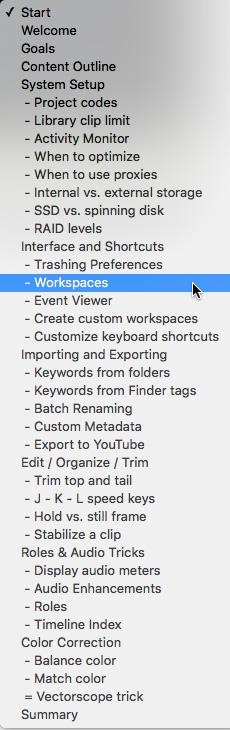
CHAPTER MARKERS
To help you quickly find the information you need, we include chapter markers in the QuickTime download to simplify navigation. Click here to learn how to display them in your download.
CONTENT OUTLINE


